

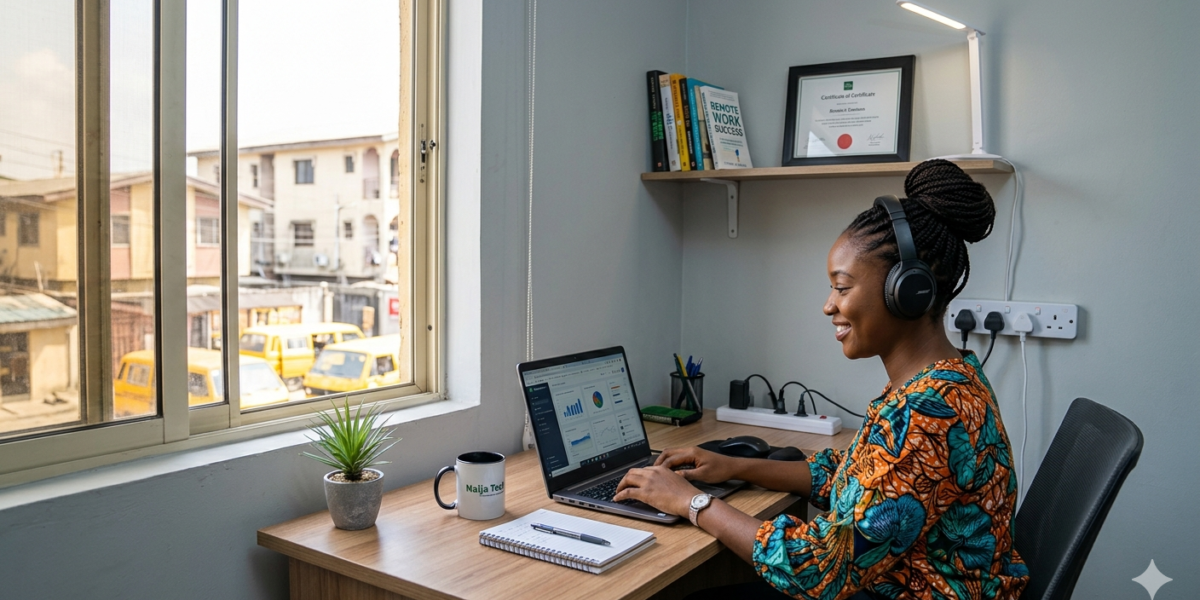
Our last post was about Work From Home Jobs in Nigeria, and an instrumental recipe for making that work was setting up a professional home office and ensuring a consistent power source, given the country’s electricity situation. Every home office guide you will find on YouTube or Google was written for someone in London, Austin, or Toronto. They will tell you to buy a Herman Miller chair (₦2,000,000+), a 4K webcam (₦150,000), and an ultra-wide monitor (₦400,000). Then they will show you a setup that requires a reliable power grid, 200mbps fibre internet that never drops, and a room temperature that a ceiling fan can handle without breaking a sweat.
That is not your reality. Your reality is NEPA, a generator budget, 4G data as backup, heat that would kill those ₦150,000 electronics in six months, and a budget that needs to produce professional results without the price tag those guides assume.
This guide is written for that reality. Every recommendation here has been made with the Nigerian context front and centre: the power situation, the heat, the import prices, the practical alternatives, and the hierarchy of what to spend money on first.
The Core Principle: Infrastructure First, Aesthetics Later
The most common home office mistake Nigerian remote workers make is spending money in the wrong order. They buy a beautiful desk and an aesthetic ring light before solving the power backup problem. This is outright putting the cart before the horse. They spend ₦80,000 on a mechanical keyboard before buying a reliable headset. They decorate their background for video calls before ensuring their internet does not drop every 45 minutes.
The correct spending hierarchy for a Nigerian home office is this, in strict order of priority:
- Power backup
- Internet reliability
- Audio quality
- Computing hardware
- Seating and ergonomics
- Everything else
Follow this order and your home office will support your work. Reverse it, and you will have a beautiful setup that fails you exactly when it matters most.
Priority 1: Power Backup — The Non-Negotiable Foundation
Everything else in this guide is irrelevant if your power situation is not solved. A missed deadline, a dropped interview call, or a crashed laptop mid-project because of NEPA is a career event in remote work. It does not matter how skilled you are if you are consistently unavailable or unreliable.
Option A: UPS (Uninterruptible Power Supply) – The Minimum
A UPS is a battery backup device that sits between your wall socket and your devices. When power goes out, the UPS instantly switches to battery power – seamlessly, without any interruption to your laptop or router. For short outages of 30–90 minutes, a good UPS is all you need.
What to buy: For a laptop and router, a 650VA–1000VA UPS is sufficient. Brands available in Nigeria: APC (most reliable, widely available at Slot, Computer Village, and Jumia), Luminous, Felicity. Budget: ₦35,000–₦75,000 for a quality unit. Avoid the cheapest options. A UPS that fails during a client call is worse than no UPS because it gives false confidence.
What it covers: Laptop, router, external monitor (if you have one), and phone charging. It does not power air conditioning, fans, or lights – it is a targeted solution for your work equipment only.
Cons: If you do not belong to the Band A league of champions, this may not work for you because power may be out for extended hours or even days, and 30 minutes to 1 hour and 30 minutes of power is not adequate for you.
Option B: Inverter System — For Serious Remote Work
An inverter with a deep-cycle battery is the step up from a UPS. It provides longer backup duration (4–12 hours depending on battery capacity and load), can charge from the mains when power is available, and can also be connected to solar panels for a fully renewable backup system.
Basic inverter setup cost: ₦150,000–₦350,000 for a 1kVA inverter with a 100Ah–200Ah battery. This setup will comfortably run a laptop, a router, an LED light, and a small fan for 6–8 hours per discharge cycle.
Solar addition: Adding a 200W–400W solar panel (₦60,000–₦120,000) means the battery recharges during daylight hours even when NEPA is absent. For Nigerian remote workers in areas with long outage windows, a solar inverter is the most reliable power solution available at a reasonable cost.
Who to buy from: Do not buy inverter equipment from people who cannot explain the technical specifications to you clearly. Solar and inverter installers with verifiable reviews on Google, on their website, or from referrals in your network are worth the slight premium over Computer Village walk-ins.
The Generator Question
Generators are noisy, cause audio issues on video calls, emit exhaust fumes that shouldn’t be in your workspace, require fuel cost management, and introduce maintenance overheads that distract from work. For dedicated remote work, an inverter-plus-battery is a significantly better solution than a generator for all but the most power-intensive setups. Use your generator for the household, and let the inverter protect your workspace.
Priority 2: Internet — Reliability Over Raw Speed
Nigerian remote workers consistently report internet reliability as a bigger problem than internet speed. A 20mbps connection that drops every 90 minutes is worse for remote work than a 10mbps connection that holds steady for six hours. Stability first, speed second.
Primary Connection Options
Fibre broadband: If fibre is available in your area, from providers like MTN, MainOne, FibreOne, ipNX, or any local FTTH provider, this is your best primary connection. Speed is consistent, latency is low (important for video calls), and it does not consume a SIM card data plan. Budget: ₦15,000–₦35,000/month depending on speed tier and provider.
5G router: Where fibre is not available, a 5G router from MTN or Airtel is your next best option. The 5G coverage in Lagos, Abuja, and most major Nigerian cities is sufficient for remote work, including video calls. The limitation is data cost. Unlimited plans are expensive at ₦20,000–₦40,000/month, and capped plans create anxiety about data consumption. Budget for at least 50GB/month minimum for professional remote work, including video calls.
The Backup Connection — Non-Negotiable
Every serious Nigerian remote worker has a backup internet connection from a different network provider. When your primary goes down – and it will – you switch to backup without missing a beat.
The most practical setup: primary connection on one network (e.g., FibreOne or MTN 5G router) and a second SIM from a different network (e.g., Airtel or Glo) in a second router or as a phone hotspot. The backup does not need to be fast; it just needs to keep you connected for the duration of a client call or to meet a deadline while your primary internet is restored.
Budget: ₦5,000–₦15,000/month for a dedicated backup data plan. This is the cheapest insurance you will ever buy for your remote career.
Router Placement and Wi-Fi Quality
Two points about router placement that are consistently underestimated: First, your router should be as close to your workspace as possible, not in another room. Every wall between you and the router degrades the signal. If you cannot move the router, use a powerline adapter or a Wi-Fi extender to bring a strong signal to your workspace. Second, where possible, use a wired Ethernet connection from your router to your laptop rather than Wi-Fi. Wired connections have dramatically lower latency and zero interference from neighbours’ Wi-Fi networks or microwave ovens, both of which can degrade wireless connections in apartment buildings.
Priority 3: Audio — The Most Underinvested Priority
Audio quality is the most underinvested priority in Nigerian home offices, and it costs remote workers more than they realise. In a remote work context, your voice is your presence. Poor audio means background noise, echo, tinny sound, volume inconsistency, etc., and it is fatiguing to listen to and creates a subliminal impression of unprofessionalism that better-looking equipment does not fix.
The Headset: Your Most Important Purchase
A dedicated headset with a close-proximity microphone solves three problems simultaneously: it eliminates background noise from your environment (generator, traffic, family members), it prevents echo by keeping the audio you hear from reaching your microphone, and it makes your voice sound consistent and clear regardless of how loud or quiet your natural voice is.
Budget recommendation: ₦8,000–₦20,000 for a quality USB or 3.5mm headset. Brands to look for in Nigeria: Logitech H390 (USB, excellent call quality, available at Slot and Jumia for approximately ₦15,000–₦18,000), Jabra Evolve 20 (USB, professional grade, approximately ₦25,000 if you can find it), or any well-reviewed headset with a boom microphone rather than an in-line microphone on the cable.
What to avoid: Apple AirPods or wireless earbuds as your primary work headset. The microphone quality is significantly inferior to that of a dedicated headset with a boom mic, and the battery limitation creates a risk during long calls.
The Room Acoustics Problem
Hard surfaces like concrete walls, tiled floors, and glass windows create echo and reverb that makes voices sound hollow and unprofessional on calls. Soft surfaces absorb sound and improve audio quality naturally. If your workspace has a lot of hard surfaces, adding a rug, a bookshelf with books, curtains on windows, and cushioning on at least one wall behind your chair will make a meaningful difference to how you sound on calls without requiring acoustic foam panels.
Priority 4: Computing Hardware
Your laptop is your primary work tool. The relevant question is not “which laptop should I buy” but “is what I have adequate for the work I am doing, and if not, what is the minimum I need to spend to fix that?”
Minimum Specification for Professional Remote Work in 2026
- RAM: 8GB minimum. 16GB if you work with video editing, data analysis, or multiple applications simultaneously.
- Processor: An Intel Core i5 (8th generation or newer) or AMD Ryzen 5 (3rd generation or newer) handles most professional remote work without overheating or lagging.
- Storage: 256GB SSD minimum. SSDs are dramatically faster than HDDs and have no moving parts to fail in Nigerian heat. If your current laptop has an HDD, replacing it with an SSD (₦25,000–₦50,000 for a 500GB SSD) is often a more cost-effective upgrade than buying a new machine.
- Battery: Should hold at least 3–4 hours of real-world use. If your battery drains in 90 minutes, replace it. A laptop tied to the wall is a liability when NEPA acts unpredictably.
Buying in Nigeria: New vs Refurbished
The price of new laptops in Nigeria in 2026 reflects import duties, exchange rate movements, and distributor margins that make brand-new hardware expensive relative to income. The UK-refurbished laptop market, which is available through dealers in Computer Village and verified online vendors, offers machines that are typically 1–2 years old in excellent working condition at 40–60% of new prices. A refurbished ThinkPad X1 Carbon (one of the most reliable business laptops ever made, legendary for durability) is often available for ₦200,000–₦350,000 in good condition and will outperform a cheap new laptop at twice the price.
What to verify before buying refurbished: battery health (ask the seller to show you the battery report), screen condition (check for dead pixels and backlight bleed), keyboard function (test every key), and ports (check USB, HDMI, and headphone jack).
Priority 5: Seating and Ergonomics
Remote work is sedentary work. Spending eight hours per day in a chair that does not support your posture correctly will produce back pain, shoulder tension, and concentration problems that affect your work quality within months and your health over the years. This is not vanity; it is productivity infrastructure.
You do not need to spend ₦200,000 on an imported ergonomic chair. You need a chair that:
- Allows your feet to rest flat on the floor with your knees at a 90-degree angle
- Supports your lower back (a lumbar roll, available for ₦3,000–₦8,000 and can add lumbar support to any chair)
- Has armrests at a height that allows your shoulders to relax rather than shrug
Decent office chairs are available in Lagos markets (Ojuelegba furniture market, for example) and on Jiji for ₦25,000–₦70,000. Test before you buy. Sit in it for five minutes, not five seconds.
Your desk height should allow your elbows to be at approximately 90 degrees when typing. If your desk is too high, raise your chair and add a footrest. If your screen is too low, raise it to eye level. A stack of hardback books is free and effective.
The Complete Nigerian Home Office Budget
Here is the realistic cost breakdown for a properly equipped Nigerian remote work setup at three budget levels:
Starter Setup — ₦180,000–₦280,000
- UPS (650VA APC): ₦40,000
- MTN/Airtel 5G router + monthly plan: ₦80,000 setup + ₦20,000/month
- Backup SIM data: ₦8,000/month
- Logitech H390 headset: ₦17,000
- Desk lamp (face-lighting): ₦5,000
- Existing laptop (if adequate) + SSD upgrade if needed: ₦30,000–₦50,000
Professional Setup — ₦500,000–₦750,000
- 1kVA inverter + 100Ah battery: ₦220,000
- Fibre broadband (where available): ₦25,000/month
- 5G backup router + plan: ₦80,000 setup + ₦10,000/month
- Jabra or Logitech professional headset: ₦25,000
- Refurbished ThinkPad or Dell business laptop: ₦250,000
- External monitor (24-inch 1080p): ₦80,000
- Decent office chair: ₦50,000
High-Performance Setup — ₦1,200,000–₦2,000,000
- 2kVA inverter + 200Ah battery + 400W solar: ₦650,000
- Fibre broadband: ₦35,000/month
- Jabra Evolve2 headset: ₦85,000
- New business laptop (Dell XPS, MacBook Air M2): ₦650,000
- 27-inch 1440p external monitor: ₦180,000
- Ergonomic mesh chair: ₦120,000
Start at whatever level your budget allows and upgrade systematically as your remote income grows. The most important thing is to solve the power and internet problems first, at whatever budget you have. Everything else can wait.







Deprecated: File Theme without comments.php is deprecated since version 3.0.0 with no alternative available. Please include a comments.php template in your theme. in /var/www/worklandhq/wp-includes/functions.php on line 6260